Processing
Processing runs on MapperTool's render nodes, not on your computer.
While a job runs
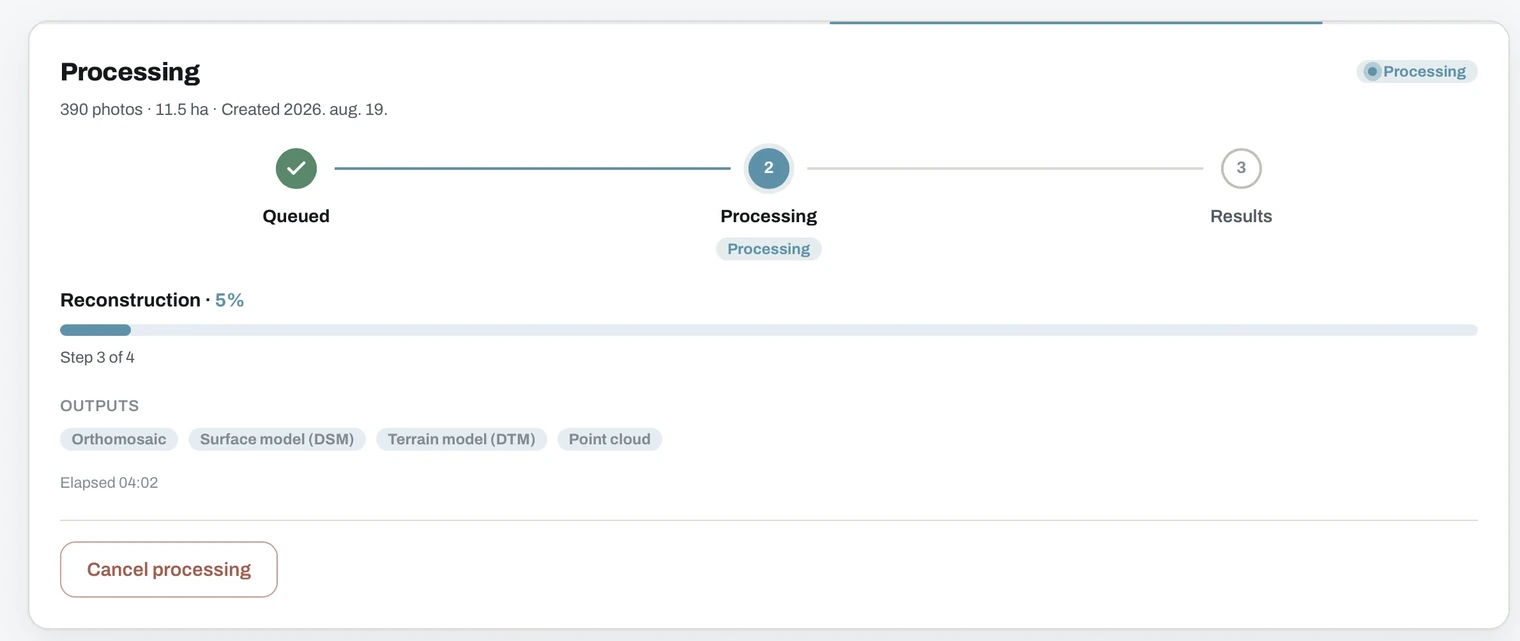
The progress screen walks through three stages: Queued, Processing, Results.
- The image count, covered area and creation date sit at the top.
- The current stage is named, for example Reconstruction, with a percentage and a step counter such as Step 3 of 4.
- The outputs you selected are listed as chips.
- Elapsed time counts up while the job runs.
- Cancel processing stops the job. The upload stays, so you can start again with different settings.
Most jobs start immediately. If the system is busy, the job waits in a queue first, and higher plans get priority. See dashboard.
You can close the tab at any point, queued or running. You are notified when the results are ready.
Raw images are deleted after processing
Once a job finishes, your uploaded images are kept only for a limited window, then deleted permanently.
- Free. 24 hours
- Plus. 48 hours
- Pro. 7 days
This is also your reprocessing window. A project can be reprocessed once, with different outputs or a different quality level, while the raw images are still there. After they are deleted, the results remain but the project cannot be processed again.
Always keep your own copy of the raw images. Once the window closes, they cannot be recovered.
The results themselves are stored longer than the raw images. See pricing for how long, and dashboard for the expiry countdown.